How to switch from Wordpress to Squarespace

 
A lot of people say that switching from Wordpress to Squarespace is difficult. Well... I'm here to prove that statement wrong by showing you guys a really simple process of switching from Wordpress to Squarespace. Don't believe me? Click on this pin…

Please Note: I do not offer this as a service. It's simply a tutorial to help you do it yourself, so please don't email me for a quote. Thanks friends!


A lot of people say that switching from Wordpress to Squarespace is difficult. It's something I used to believe too until I made the switch myself. I'm delighted to tell you that I easily switched my website over within a day and I didn't run into any problems!

Squarespace has an amazing library of tutorials that help you figure out how to do all things Squarespace-related, but a lot of people have been asking me for tips of how they can set up their Squarespace website or transfer from Wordpress, so I've decided to make a step-by-step tutorial!

Let's go through a few common questions before we get started...

What will this tutorial include?

  • How to set up your Squarespace website.
  • How to import website content from Wordpress to Squarespace.
  • How to switch your custom domain from Wordpress to your new Squarespace website.
  • URL mapping, so your old blog post URLS still work.
  • And more!

What is imported from Wordpress to Squarespace?

  • Blog posts
  • Page content
  • Users/authors
  • Images
  • Comments
  • Attachments

What isn't imported?

  • Your website theme and layout are not imported. You'll have to choose a Squarespace theme. 
  • Plugins
  • Widgets

Can I easily make the switch myself?

Yes. If you're confident with making changes to your DNS records, this will be a breeze. If you're not very tech-savvy then I advise you hire someone else to switch your website from Wordpress to Squarespace for you. (Please Note: I do not offer this as a service.)


Step 1. Sign up for Squarespace

Head to the Squarespace website and sign up for a trail account. 

Step 2. Choose a template

After you signing up you'll need to choose a template for your website. As I mentioned before, you can't import your Wordpress theme or layout to Squarespace so choose a theme that is similar. I chose the Galapagos theme because it's simple, clean and very similar to my old Wordpress site. However, there are plenty of other themes to choose from. 

  • Adriondack: perfect for online entrepreneurs.
  • Montauk: Great for minimalists. 
  • Avenue: A beautiful portfolio template for designers and photographers.

Step 3. Fill in your basic information

Head to the Settings section and fill in your business name and description, connect your social media accounts, alter your blog settings, add a business email address (eg. hi@yourbusiness.com) and play with the other settings. It's not complicated- you'll be done in 10 minutes!

Step 4. Change your SEO settings.

Squarespace SEO is just as good as Wordpress SEO. In fact, it's even better because you don't have to install SEO plugins or make changes yourself! Your theme has already been optimized for SEO by the creators. Go to Settings > Marketing > SEO and simply enter a description for your website. You don't need to change much else.

Step 5. Import your Wordpress content

Go to Settings > Advanced > Import/Export > Import > Wordpress. You'll have to enter your URL and Wordpress login details and then click import. A progress bar will indicate that your Wordpress content is importing and a 'success' message will appear when it's done. It takes about 5-10 minutes. Simple!

Step 6. Enable your imported content

In the Pages section, scroll down to Not Linked. You'll see all your imported pages here. To enable them, click the settings icon on each page and click enable. Then go through your imported pages and add your main ones to your navigation menu.

Step 7. Upgrade your account

When your site is completely ready, upgrade your account. I use the Business plan which is $26 per month or $18 if you pay annually. I prefer this plan because it offers unlimited pages. If your Wordpress website had lots of pages, this plan will probably suit you too.

Step 8. Transfer your existing domain to Squarespace

It's not exactly transferring, but I call it that. You need to keep your domain where you're currently hosting it (on Godaddy or Dreamhost etc) and map your domain to your Squarespace website. 

You'll need to go to Settings > Domains > Connect a third party domain. Enter your domain name, click on your host provider and click Connect Domain. A new panel will open with the records you need to enter in your hosting account so your domain can connect to Squarespace.

*This above image is from Squarespace themselves.

I'm not going to show you how to add these records to DNS settings because Squarespace has amazing tutorials on how to do that here. If you're not confident in doing this, you can hire someone professional to do it for you.

Step 9. Wait for your domain to work

When you've added those records to your hosting account, your domain will connect to your site within 24 hours. You can keep checking back to see how it's going by visiting Settings > Domains. Your domain will have a red line by it if it hasn't gone through, an amber line if it's almost there, and a green line when it's done. 

*This above image is from Squarespace themselves.

Step 10. URL mapping

After 24 hours, your custom domain will point to your Squarespace website. But it isn't over yet! Wordpress post URLS are different to Squarespace post URLs. In Wordpress, your blog post URL would have looked like this: yourdomain.com/my-first-blog-post whereas in Squarespace it will be yourdomain.com/blog/my-first-blog-post. Spot the difference? This isn't good because anyone who clicks on your blog posts from sites like Pinterest will now be taken to a 404 page.

To fix this, go to Settings > Advanced >URL Mappings. This function allows you to easily redirect broken links to the correct links. 

A URL mapping will look like this:

/old-url -> /new-url 301

For example, check out my URL mapping below (highlighted in yellow). I've pasted the old URL without www.neshadesigns.com in front of it, added an arrow, pasted the new URL, and added 301 at the end to make it a permanent change. 
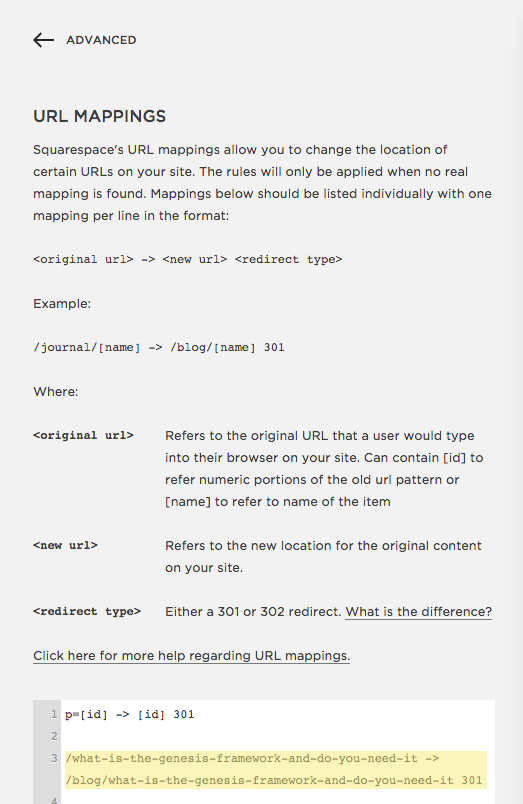
It may not be practical to fix every blog post link- after all, who has that kind of time? Instead, I fixed the links for my 30 most popular blog posts. You may want to do the same and then fix the other links over time.

For more information on URL mapping, click here.

Please Note

You can't transfer your Wordpress website design to Squarespace. You have to choose a Squarespace template and customize it. 


Why I switched from Wordpress to Squarespace (after being such a Squarespace hater!)

 
Click on this pin to find out why I made the decision to switch from Wordpress to Squarespace and no it's not because it's better but something much more. Find out what that 'much more' is now! #Business #Design #Sqaurespace #Wordpress, #Web Design

OK, so I didn't hate Squarespace... That's a little dramatic of me. But I didn't understand the hype around it, or why why dozens of my friends were switching from Wordpress to Squarespace.

I tried it for a day and decided that it was OK, but not as good as Wordpress. I even wrote a blog post outlining the pros and cons of both and favoring Wordpress. (That post has since been updated with a fair amount of pros for both.)

However, a conversation with a friend totally changed my opinion of Squarespace. 

As we sat drinking frappucinos one afternoon, we began talking about work. I told her everything was going well and I was still enjoying my business. But I wished things were a little more simple. 

I explained that one of my goals this year is to achieve a simple business. I thrive most when things are simple, easy and clean. I've noticed this spans into my personal life too, not just my business. I like simple interior decor, simple outfits, and I much prefer a simple and quiet life over a busy city life.

I've slowly realized that when my business systems and strategies are simple, I feel happier and more relaxed. And my business blooms a lot more when I feel that way!

I told my friend that I'd simplified a lot of my systems, but things still didn't feel 'easy' enough. I'm a big believer that business should be easy, or else it isn't fun. 

"You wrote a blog post on Wordpress vs. Squarespace, right?"

I nodded. 

"I know Wordpress is awesome and offers everything you could ever need in a website, and I know that you love it. But maybe what you need is a simpler platform, with less updates and plugins and themes. Like Squarespace."

She'd been raving about Squarespace all year and I'd just rolled my eyes. But it was when she said that (or something to that effect, anyway) that I decided to give Squarespace one last try.

I signed up for another trial of Squarespace and set myself a little excercise: see how long it takes to rebuild my website on Squarespace, getting as close as I could to my Wordpress design.

And here's the amazing thing: it took just two days, and that was in between doing client work. 

Here the other amazing thing: I think my Squarespace sites looks better than my Wordpress site. 
It's amazing how much better my second Squarespace trial was. Maybe it's because I actually gave myself an assignment instead of fiddling with a theme I wasn't interested in. Either way, I've found myself jumping on the Squarespace bandwagon. Not because it's better than Wordpress but because it has something Wordpress doesn't: severe simplicity. Anyone could learn Squarespace in a day, and that really appeals to me. 

A few more reasons why I switched from Wordpress to Squarespace (after being such a Squarespace hater):

  • I knew my clients would love it. I design brands and websites for small business owners, and they usually like to maintain and update their website themselves when our project is over. Squarespace is the perfect platform for them to maintain their site easily without getting confused or stressed out.
  • I love the drag and drop feature. I barely have to touch any code!
  • I love that it's limited, which is ironic because that's one of the aspects I disliked to begin with. But I love that my clients and I can only choose from a certain amount of themes. It stops us from overthinking things.

I'm very happy with my decision to switch from Wordpress to Squarespace. In fact, I'm thinking of creating a mini-series on it for you very soon!

In case anyone is wondering, I'm using the Galapagos theme. It's a very popular theme for bloggers because of how simple and clean it is, so I highly recommend you try it if you're a Squarespace user!

I'd love to know- are you thinking about switching to Squarespace? Do you have any questions or concerns?


Squarespace or Wordpress?

The question we all ask whether that be when were starting out on our freelance journey or wanting to make a switch, is which one is better for me - Sqaurespace or Wordpress? Well worry no more! Click on this pin to see the naked truth about both pl…

UPDATE: Since moving my website from Wordpress to Squarespace, this post has been updated.

Amy, an event planner, emailed me the other day and asked this:

Should I choose Squarespace or Wordpress? I like Squarespace- it's easy to use and the themes are clean and gorgeous. But I've heard a lot of people use Wordpress and it's apparently the better option. Help?

Both are fantastic website builders, but I'd like to point out that every business owner is different. Just because Squarespace or Wordpress works for someone else, doesn't mean it's the best fit for you. The only way you can decide which platform is the right one for you is by doing your research and testing them both.

I used Wordpress for 4 years before switching to Squarespace, so I have a pretty rounded-out view of both. Here are the pros and cons I've discovered:

Flexibility

  • Wordpress is an open source platform, which means that you or your web developer can customize their codes and make your website truly unique.
  • Squarespace isn't an open source platform, which stops a lot of people from using it. But if you sign up for the Professional package (which most users go for) you get access to the developers platform, which allows you to make changes to your website's html etc. 
  • There are thousands of themes available for Wordpress users, so you have a lot more choice on what your website looks like. Choice is great! But you have to be careful what theme you choose- some are coded awfully and don't offer any kind of customer support when things go wrong.
  • Squarespace doesn't offer hundreds of themes. But because the Squarespace team have focused on their select variety of themes, they are coded amazingly and are constantly being updated.

User Interface

  • Wordpress is fairly easy to use, but it takes a bit of getting used to when you first join. For instance, you need to learn what plugins, themes, child themes and widgets are. 
  • Because of its limited flexibility, Squarespace is really easy and simple to use. It has a drag and drop feature, so you don't have to tweak any code. You just drag a photo or a text block into place.

Support

  • There are lots of Wordpress forums that can help you if you get stuck with anything Wordpress-related, but it can sometimes be difficult to get a correct and quick answer. There are also lots of fantastic books on Wordpress, like this one
  • Because Squarespace limits it's themes, their team are more in control and can provide great support. In fact, they strive to answer all questions within one hour.

Pricing

  • Squarespace can cost $96-$288 per year, and they offer a free domain name and free support. Depending on the package you choose, you can end up paying more than you would for a Wordpress website. But if you value simplicity and amazing support, it's worth it. 
  • Self-hosted Wordpress is a similar price depending on where you host your website- I recommend Dreamhost. However, you also have to pay for a theme (a one-time payment of about $30-$50) and a domain name (about $10 per year.) You may also end up paying for premium plugins if you really want to.

My opinion

If you're not very tech savvy, you want to be able to maintain your website yourself, and you value simplicity, I'd recommend Squarespace. I use Squarespace for my own website and I love it! I offer a Squarespace website design package if you're interested.

However, Wordpress is more flexible and offers thousands of themes and plugins. If you're good with code, or you want things like membership websites, Wordpress is probably best for you. Squarespace offers the option of password-protected pages, but it doesn't allow you to create membership websites like Wordpress does.

Choosing a website platform is a personal decision and I'm not telling you which one is best for you; this is just my personal opinion. If you have any questions or you need help choosing the right platform for you, I'd love to help! Just leave a comment on this post.

Tell me in a comment- do you prefer Wordpress or Squarespace? 


How to get referrals from your clients

 
Copy of Copy of Copy of Templates_ Opt-In Button (1).png
Click on this pin to find out how to get referrals from clients and what are my top 3 ways of doing so. #Business #Referrals #Clients #Freelance #Tips

These are the top 3 ways I find clients:

  1. Referrals from my clients.

  2. Facebook groups.

  3. Referrals from others in my niche.

I've tried a million different ways of getting clients: cold emailing, Twitter, LinkedIn, guest blogging, Facebook ads, advertising... the list goes on. While some of these have worked (I used to have great success in landing small projects through Twitter!) they just haven't worked as magically as the 3 above. Not by miles.

I've already touched on getting clients from Facebook groups. But how do you get clients through referrals? How do you get real people to persuade other real people that you're good enough to take on their project? It seems tricky, but it's not when you try your hardest.

Referrals will keep your business afloat, especially in dry times when you don't have time to market your services. With a steady amount of referrals coming in, you could...

  • Halve the time you spend marketing.

  • Stop stressing out because you haven't booked enough clients.

  • Take time off and still get plenty of inquiries in your inbox.

  • Book more clients and earn more money.

Most freelancers who have been up and running for about a year should already have referrals coming in.

If you...

  • Are good at what you do

  • Have awesome work in your portfolio

  • Have kickass testimonials from your clients

  • Have a streamlined, organized process that makes working with you easy

...then you should be getting referrals already, and plenty of them! Because when you do all of the above, people will not hesitate to recommend you to their friends and colleagues. People will only refer you if you're trustworthy, talented and efficient. So make sure you're known for being these things!

If you're doing all of the above and still not getting referrals, something needs to change. You need to think outside the box.

Here are 7 smart ways to get referrals from clients and friends:

  1. Ask directly. When wrapping up a project, as your client directly if they know of anyone who may be in need of your services.

  2. Ask indirectly. If you feel that asking them upfront is a little too forward, then ask them in your testimonial form. (A testimonial form is a short questionnaire you get your clients to fill in about your time working together, and you create their testimonial from combining their answers.) As your final question, ask 'do you know of anyone who may be in need of my services?'

  3. Collaborate. Write to a few friends and offer to send work their way if they send work your way. This works especially well if you're both in different creative industries.

  4. Create a referral program. Offer your friends and partners 5-10% of every successful referral. So, if they refer a client to you who buys a $2000 package, they would receive 5-10% of that. I know a few well-known coaches and writers who do this, and it works wonders for them!

  5. Offer an incentive. Offer your clients a discount or a freebie for every successful referral.

  6. Refer work to others. Only refer work to people you admire, trust and respect. People you genuinely think your clients will love. And when you send work their way, let them know you've done so by dropping them an email or a tweet. It opens up the way to a friendship, which could lead to them sending clients your way.

  7. Email others in your niche. Sometimes people email me asking if I will keep them in mind for referrals. If their work is good enough and their email is sincere and modest enough, I do!

I'm going to be discussing how I personally find and book clients in The Shelancers Club- an online community for freelance women that I'm launching in April. If you're interested in learning more then sign up for updates before the launch!

Last weekI ran a quiet giveaway for The Shelancers Club, and this week I chose a winner at random: Nicola at Belle Noir Loves! I'll be in touch with you soon. Thanks to everyone who participated!


Copy of Copy of Copy of Templates_ Opt-In Button (1).png
 

5 things you can do to quickly grow your business

 
Just click on this pin to find out 5 steps to quickly growing your business and how those 5 steps helped my business become what it is today. #Freelance #Marketing #Business #Freelancing #Gettingstarted

Before quitting your day job, you need to be earning a comfortable, consistent amount of money from your business. But it's pretty tricky to do that when you can only work on your business on the evenings.

You can't focus on your freelancing while you work full-time, but you can't quit your day job until you get more clients and more money. It's a never-ending, unfair cycle.

A recent reader said that her job often feels toxic and tends to mess with her creativity, which isn't good for freelancing. She wants to quit, but she has a mountain of bills that she can't reduce and not enough freelance income to cover them. She feels totally stuck.

Sound familiar?

A lot of the women I network with on social media have expressed the same feelings, and it makes me sad for them! Reeeally sad. Everyone deserves to do what they love. Everyone deserves to wake up each morning and actually feel excited to work. Everyone deserves to feel the satisfaction and fulfillment I feel when I help businesses transform their brands and websites.

A few weeks ago, I wrote of 3 things you can do while working full-time to prepare for freelancing. Today I'm here to sprinkle some hope on your day by sharing a few more helpful tips!

5 things you can do to quickly grow your business:

  1. Plan. Did you know that businesses that plan grow 60% quicker than ones that don’t? I keep a simple business plan that I update and tweak all the time. And since I’ve been doing this, my business growth has rocketed. When you plan how much money you want to earn and how you're going to get it, business growth seriously speeds up!

  2. Build connections. Without them, you’ll struggle to find clients. Connect with others in your niche, connect with ones on social media, and you’ll find that you’ll get clients referrals and friends from it.

  3. Take on small jobs. You can't take on big jobs when you work 9-5, that’s just a recipe for burnout. What you can do is take on small jobs. They will still provide you with experience, and possibly recurring clients or referrals.

  4. Collect testimonials. Even if you only do small jobs for people, collect their testimonials! When I was working full-time I designed Etsy banners for small businesses on the side, and I made sure to get a testimonial from all my clients. Testimonials are useful even if they aren’t for the kind of projects you want to be doing because people can still testify to how you work, how organized you are, how effective your communication is… This will help land you bigger clients in the future!

  5. Join or create a mastermind group. A mastermind is a small group of business owners similar at a similar level to you, and you all get together maybe once or twice a month to support and encourage each other, usually over Skype or something. Your business can grow exponentially from a mastermind group because your fellow group members will help you, push you, motivate you, and even refer work to you.

Leave a comment and let me know- how have YOU grown your business quickly and effectively?


Copy of Copy of Copy of Templates_ Opt-In Button (1).png